
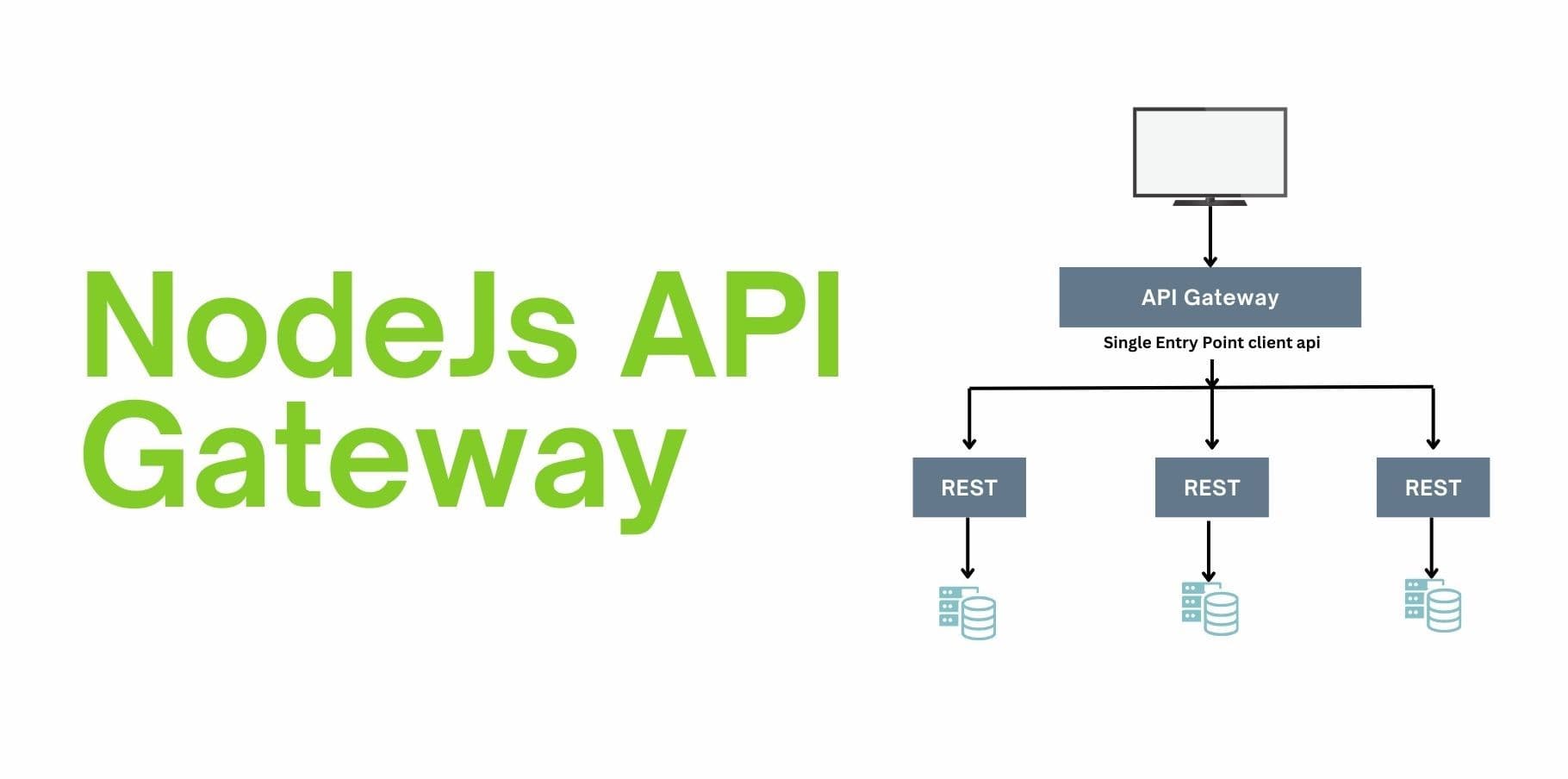
API Gateway and Microservices with Node.js: A Comprehensive Guide
The microservices architecture has gained significant traction due to its scalability, maintainability, and flexibility. However, managing multiple microservices efficiently comes with challenges, and that's where an API Gateway becomes a critical component. In this blog, we'll dive into the relationship between API Gateway and microservices and demonstrate how Node.js can power these systems effectively.
Understanding Microservices
Microservices architecture breaks down an application into smaller, independently deployable services. Each microservice is designed to handle a specific business capability, typically with its own database and a dedicated REST or GraphQL API.
Benefits of Microservices:
- Scalability: Services can scale independently based on demand.
- Flexibility: Teams can use different tech stacks for different services.
- Fault Isolation: Issues in one service don't necessarily bring down the entire system.
- Faster Development: Teams can develop and deploy services independently.
However, managing multiple endpoints for each service introduces complexity. This is where API Gateway plays a crucial role.
What is an API Gateway?
An API Gateway is a centralized entry point that manages external access to your microservices. It abstracts the internal architecture of microservices, handling tasks like routing, load balancing, authentication, and more.
Key Features of API Gateway:
Request Routing: Directs incoming client requests to the appropriate microservice.
Security: Implements authentication, authorization, and rate-limiting.
Aggregation: Combines responses from multiple microservices into a single output.
Protocol Translation: Converts between protocols like HTTP, WebSocket, or gRPC.
Monitoring: Tracks request metrics, logs, and analytics for debugging and optimization.
Node.js as the API Gateway
Node.js, with its event-driven, non-blocking I/O model, is an excellent choice for building an API Gateway. Its lightweight architecture and vast ecosystem of libraries provide the flexibility to integrate and manage microservices seamlessly.
Building an API Gateway with Node.js
Prerequisites:
- Basic understanding of Node.js and Express.js.
- Installed Node.js runtime and npm/yarn.
Step-by-Step Implementation
Setup a Basic Node.js Project: Create a new directory and initialize a Node.js project:
mkdir api-gateway
cd api-gateway
npm init -y
Install Required Dependencies:
npm install express http-proxy-middleware cors morgan
- express: Minimalist web framework.
- http-proxy-middleware: Proxy middleware for routing.
- cors: Enables Cross-Origin Resource Sharing.
- morgan: Logging middleware for request details.
Build the API Gateway: Create a server.js file and set up the gateway:
const express = require('express');
const { createProxyMiddleware } = require('http-proxy-middleware');
const morgan = require('morgan');
const cors = require('cors');

const app = express();

// Middleware
app.use(cors());
app.use(morgan('dev'));

// Proxy routes to microservices
app.use('/user', createProxyMiddleware({ target: 'http://localhost:3001', changeOrigin: true }));
app.use('/order', createProxyMiddleware({ target: 'http://localhost:3002', changeOrigin: true }));
app.use('/product', createProxyMiddleware({ target: 'http://localhost:3003', changeOrigin: true }));

// Start the gateway
const PORT = 3000;
app.listen(PORT, () => {
    console.log(`API Gateway running on http://localhost:${PORT}`);
});
- /user, /order, and /product are example endpoints routing requests to respective microservices.
Run Microservices: Create mock microservices using Express for demonstration:
- User Service (Port 3001):
const express = require('express');
const app = express();
app.get('/', (req, res) => res.send('User Service'));
app.listen(3001, () => console.log('User Service running on http://localhost:3001'));
Order Service (Port 3002):
const express = require('express');
const app = express();
app.get('/', (req, res) => res.send('Order Service'));
app.listen(3002, () => console.log('Order Service running on http://localhost:3002'));
Product Service (Port 3003):
const express = require('express');
const app = express();
app.get('/', (req, res) => res.send('Product Service'));
app.listen(3003, () => console.log('Product Service running on http://localhost:3003'));
Test the Gateway: Start the microservices and the API Gateway:
node server.js
Test the endpoints:
- http://localhost:3000/user
- http://localhost:3001/order
- http://localhost:3002/product
Enhancements to Consider
Authentication and Authorization: Use libraries like jsonwebtoken to handle authentication and attach user information to requests routed to microservices.
Rate Limiting: Implement rate limiting using middleware like express-rate-limit to prevent abuse.
Error Handling: Add global error-handling middleware to return meaningful responses.
Service Discovery: Use a service registry (e.g., Consul or Eureka) to dynamically discover microservices.
API Documentation: Integrate tools like Swagger/OpenAPI for documenting the API Gateway endpoints.
Conclusion
An API Gateway is a cornerstone of modern microservices architecture, streamlining client access and managing complexities effectively. With Node.js, building an API Gateway becomes a straightforward yet powerful solution, enabling you to harness the full potential of your microservices architecture.
By combining the modularity of microservices with the simplicity and performance of Node.js, you can build scalable, robust, and maintainable systems ready to tackle real-world challenges.