
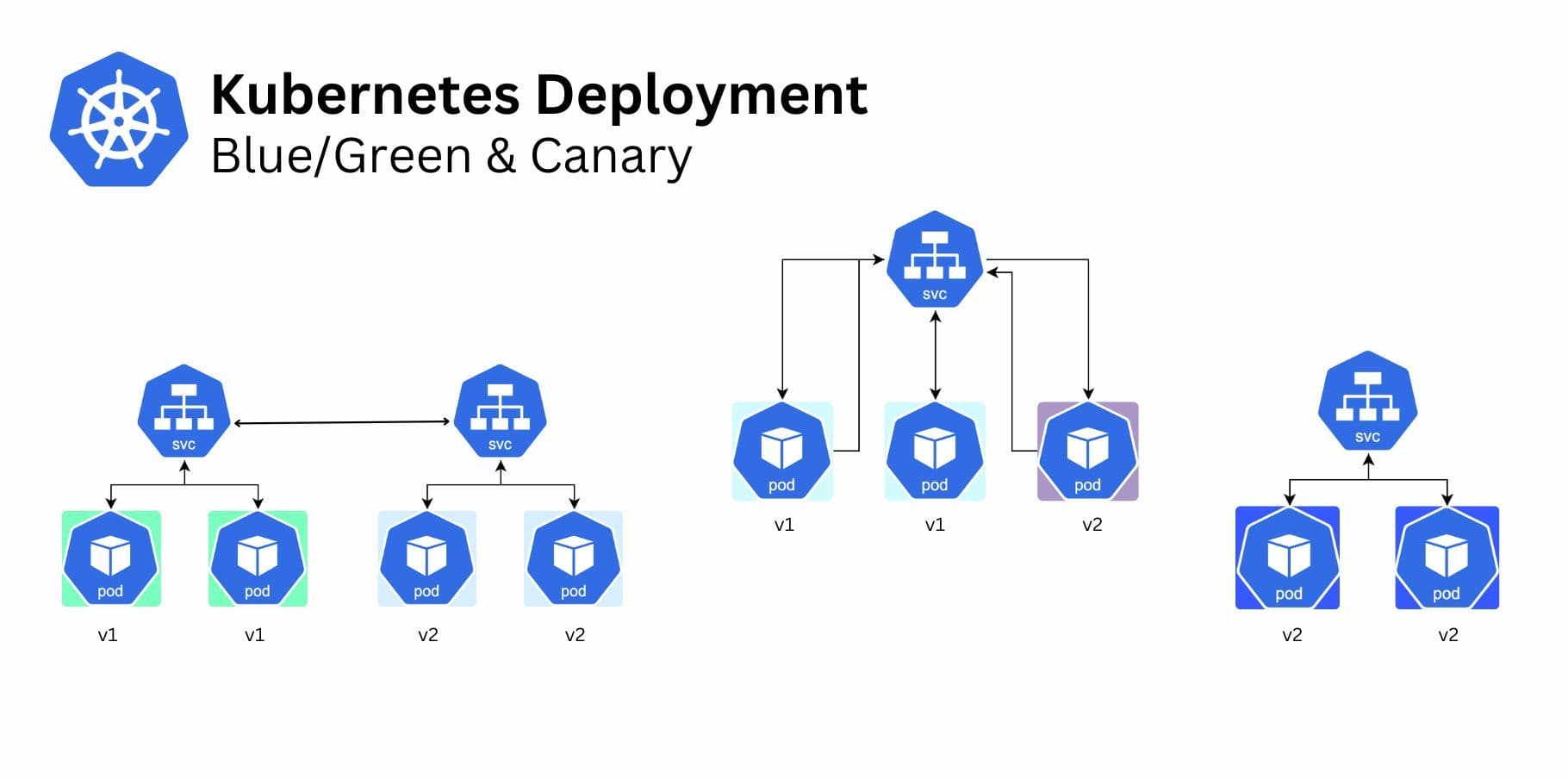
In today’s fast-paced software development landscape, minimizing downtime and risk during deployments is crucial. Two popular strategies, Canary Deployment and Blue-Green Deployment, have emerged as leading approaches to streamline the release process and ensure high availability. In this blog, we’ll explore how these methods work, their benefits, and when to choose one over the other.
What Is Canary Deployment?
Canary Deployment is a phased rollout strategy where a new version of an application is incrementally released to a subset of users before a full-scale launch. This approach derives its name from the historical practice of using canaries in coal mines to detect dangerous gases—essentially, the initial group of users serves as an early warning system.
How It Works:
A small percentage of traffic (e.g., 5%) is routed to the new version.
Metrics such as error rates, performance, and user feedback are closely monitored.
If the new version performs well, its traffic share is gradually increased until it fully replaces the old version.
If issues arise, the deployment can be rolled back quickly.
Benefits of Canary Deployment:
- Risk Mitigation: Only a small group is exposed to potential issues initially.
- User Feedback: Provides real-world insights into the new release.
- Rollback Flexibility: If issues are detected, the change can be reverted without impacting all users.
Challenges:
- Complex Traffic Management: Requires advanced load balancing or routing mechanisms.
- Monitoring Overhead: Demands robust monitoring and alerting to identify issues early.
What Is Blue-Green Deployment?
Blue-Green Deployment is a release strategy where two identical environments—blue (current live version) and green (new version)—are used. The green environment is prepared and tested before traffic is switched entirely from blue to green, ensuring a seamless transition.
How It Works:
The green environment is set up with the new application version.
Tests are conducted to ensure the green environment is functioning correctly.
Traffic is switched from blue to green in one step.
The blue environment remains as a fallback in case of issues.
Benefits of Blue-Green Deployment:
- Zero Downtime: The traffic switch is instantaneous, minimizing user impact.
- Simplified Rollback: The old environment (blue) is ready for reactivation if necessary.
- Consistency: Ensures all users are transitioned to the new version simultaneously.
Challenges:
- Resource Intensive: Maintaining two identical environments doubles infrastructure costs.
- Pre-Deployment Testing Complexity: Requires thorough testing before the switch to avoid post-launch surprises.
Comparing Canary and Blue-Green Deployment
Here’s how Canary and Blue-Green deployments stack up against each other:
- Risk Management:
- Canary Deployment: Reduces risk by gradually exposing a small subset of users to the new version, allowing for early issue detection.
- Blue-Green Deployment: Mitigates risk by keeping a fully functional fallback (blue) environment ready, ensuring seamless rollback if needed.
- Downtime:
- Canary Deployment: Minimal downtime as updates are phased and impact is incremental.
- Blue-Green Deployment: Zero downtime, as the traffic switch between environments is instantaneous.
- User Experience:
- Canary Deployment: Only a subset of users interacts with the new version initially, so potential issues are contained.
- Blue-Green Deployment: All users are switched to the new version simultaneously, maintaining a uniform experience.
- Infrastructure Requirements:
- Canary Deployment: Requires robust traffic routing, monitoring, and alerting systems but doesn’t duplicate environments.
- Blue-Green Deployment: Demands duplicate environments, doubling infrastructure costs.
- Rollback Process:
- Canary Deployment: Simple to revert by directing traffic back to the previous version for affected users.
- Blue-Green Deployment: Rollback is straightforward, as the old environment remains intact and operational.
- Use Case Suitability:
- Canary Deployment: Best for large-scale systems where real-world feedback and gradual exposure are beneficial.
- Blue-Green Deployment: Ideal for systems where downtime must be completely avoided and updates need to be instantaneous.
When to Use Which?
Choose Canary Deployment if:
- You have a large and diverse user base that allows phased testing.
- You require real-world feedback and metrics before a full rollout.
- Your infrastructure supports dynamic traffic routing and monitoring.
Choose Blue-Green Deployment if:
- Zero downtime is a top priority, such as in e-commerce or financial systems.
- You want a straightforward rollback mechanism.
- Budget allows for maintaining duplicate environments.
Conclusion
Both Canary and Blue-Green deployments are powerful strategies to reduce downtime and risk in software releases. The choice between them depends on your organization’s priorities, infrastructure capabilities, and tolerance for risk. By understanding the strengths and limitations of each approach, you can deliver updates with confidence while maintaining a seamless user experience.