
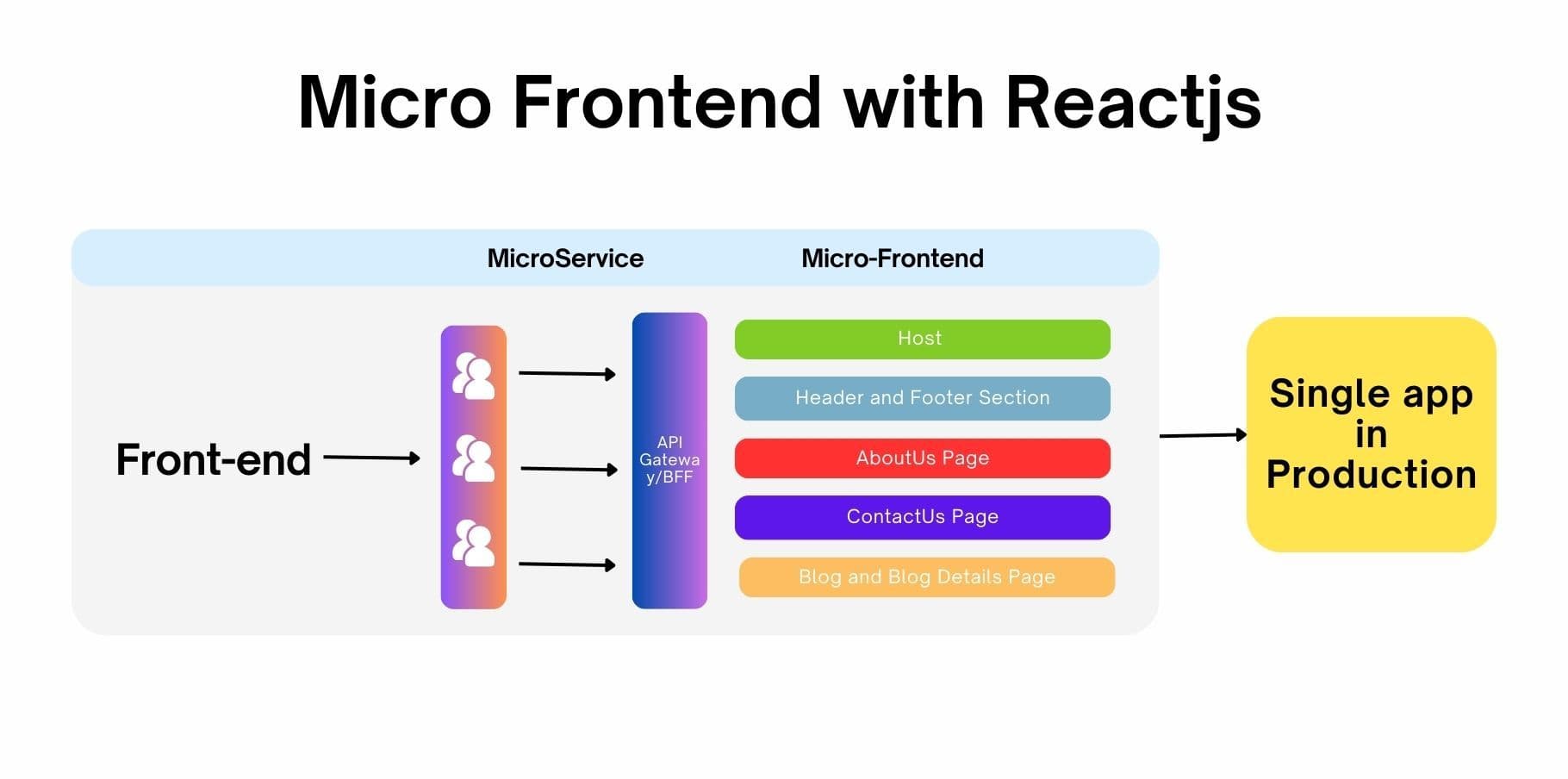
Micro UI architecture allows you to build modular applications where each component can be developed, deployed, and maintained independently. This approach not only improves team collaboration but also enhances the scalability and maintainability of applications.
In this guide, we will set up a Micro UI architecture using:
- React for building the user interface.
- TypeScript for type safety and better development experience.
- Tailwind CSS for styling.
- Webpack with Module Federation for seamless integration of micro applications.
- Docker for easy deployment and scaling.
Prerequisites
- Node.js (v18.x recommended)
- npm or Yarn
- Docker and Docker Compose
- Basic understanding of React and TypeScript
Project Structure
We will create the following applications:
- Host Application: This is the main application that loads all micro UI components.
- Header and Footer Application: Contains the header and footer components.
- About Us Application: Displays information about the application.
- Contact Us Application: Contains contact information.
- Blog Application: Displays a list of blogs and blog details.
Directory Structure
micro-ui/
├── host/
│   ├── Dockerfile
│   ├── package.json
│   ├── src/
│   │   ├── App.tsx
│   │   ├── index.tsx
│   │   └── index.css
│   └── webpack.config.js
├── headerFooterApp/
│   ├── Dockerfile
│   ├── package.json
│   ├── src/
│   │   ├── Header.tsx
│   │   ├── Footer.tsx
│   │   └── index.ts
│   └── webpack.config.js
├── aboutUsApp/
│   ├── Dockerfile
│   ├── package.json
│   ├── src/
│   │   └── AboutUs.tsx
│   └── webpack.config.js
├── contactUsApp/
│   ├── Dockerfile
│   ├── package.json
│   ├── src/
│   │   └── ContactUs.tsx
│   └── webpack.config.js
└── blogApp/
    ├── Dockerfile
    ├── package.json
    ├── src/
    │   ├── BlogList.tsx
    │   ├── BlogDetails.tsx
    │   └── index.ts
    └── webpack.config.js
Step 1: Setting Up Each Application
Host Application
Create host/package.json
{
  "name": "host",
  "version": "1.0.0",
  "scripts": {
    "start": "webpack serve --mode development",
    "build": "webpack --mode production"
  },
  "dependencies": {
    "react": "^18.2.0",
    "react-dom": "^18.2.0"
  },
  "devDependencies": {
    "typescript": "^5.1.3",
    "webpack": "^5.88.0",
    "webpack-cli": "^5.1.4",
    "webpack-dev-server": "^4.14.1",
    "html-webpack-plugin": "^5.5.0",
    "ts-loader": "^9.4.3",
    "postcss": "^8.4.23",
    "autoprefixer": "^10.4.14",
    "tailwindcss": "^3.3.3"
  }
}
Create host/webpack.config.js
const path = require('path');
const { ModuleFederationPlugin } = require('webpack').container;
const HtmlWebpackPlugin = require('html-webpack-plugin');

module.exports = {
  entry: './src/index.tsx',
  output: {
    filename: 'bundle.js',
    path: path.resolve(__dirname, 'dist'),
    publicPath: 'http://localhost:3000/',
  },
  mode: 'development',
  devServer: {
    port: 3000,
    historyApiFallback: true,
  },
  resolve: {
    extensions: ['.ts', '.tsx', '.js', '.jsx', '.json'],
  },
  module: {
    rules: [
      {
        test: /\.tsx?$/,
        use: 'ts-loader',
        exclude: /node_modules/,
      },
      {
        test: /\.css$/,
        use: ['style-loader', 'css-loader', 'postcss-loader'],
      },
    ],
  },
  plugins: [
    new ModuleFederationPlugin({
      name: 'host',
      remotes: {
        headerFooterApp: 'headerFooterApp@http://localhost:3001/remoteEntry.js',
        aboutUsApp: 'aboutUsApp@http://localhost:3002/remoteEntry.js',
        contactUsApp: 'contactUsApp@http://localhost:3003/remoteEntry.js',
        blogApp: 'blogApp@http://localhost:3004/remoteEntry.js',
      },
      shared: {
        react: { singleton: true },
        'react-dom': { singleton: true },
      },
    }),
    new HtmlWebpackPlugin({
      template: './public/index.html',
    }),
  ],
};
Create host/src/App.tsx:
import React, { useEffect, useState } from 'react';

const loadComponent = (remote: string, module: string) => {
  return async () => {
    const container = await window[remote];
    const factory = await container.get(module);
    return factory();
  };
};

const App: React.FC = () => {
  const [Header, setHeader] = useState<React.FC | null>(null);
  const [Footer, setFooter] = useState<React.FC | null>(null);
  const [AboutUs, setAboutUs] = useState<React.FC | null>(null);
  const [ContactUs, setContactUs] = useState<React.FC | null>(null);
  const [BlogList, setBlogList] = useState<React.FC | null>(null);
  const [BlogDetails, setBlogDetails] = useState<React.FC | null>(null);

  useEffect(() => {
    loadComponent('headerFooterApp', './Header')().then((component) => {
      setHeader(() => component);
    });
    loadComponent('headerFooterApp', './Footer')().then((component) => {
      setFooter(() => component);
    });
    loadComponent('aboutUsApp', './AboutUs')().then((component) => {
      setAboutUs(() => component);
    });
    loadComponent('contactUsApp', './ContactUs')().then((component) => {
      setContactUs(() => component);
    });
    loadComponent('blogApp', './BlogList')().then((component) => {
      setBlogList(() => component);
    });
    loadComponent('blogApp', './BlogDetails')().then((component) => {
      setBlogDetails(() => component);
    });
  }, []);

  return (
    <div className="p-5">
      <h1 className="text-3xl font-bold mb-4">Micro UI Host Application</h1>
      {Header && <Header />}
      {AboutUs && <AboutUs />}
      {ContactUs && <ContactUs />}
      {BlogList && <BlogList />}
      {BlogDetails && <BlogDetails />}
      {Footer && <Footer />}
    </div>
  );
};

export default App;
Create host/src/index.tsx:
import React from 'react';
import ReactDOM from 'react-dom';
import App from './App';
import './index.css';

ReactDOM.render(
  <React.StrictMode>
    <App />
  </React.StrictMode>,
  document.getElementById('root')
);
Create host/public/index.html:
<!DOCTYPE html>
<html lang="en">
<head>
    <meta charset="UTF-8">
    <meta name="viewport" content="width=device-width, initial-scale=1.0">
    <title>Micro UI Host</title>
    <link href="https://cdn.jsdelivr.net/npm/tailwindcss@3.3.3/dist/tailwind.min.css" rel="stylesheet">
</head>
<body>
    <div id="root"></div>
</body>
</html>
Remote Applications
Repeat the steps below for each remote application: headerFooterApp, aboutUsApp, contactUsApp, and blogApp.
Example for Header and Footer Application (headerFooterApp)
Create headerFooterApp/package.json:
{
  "name": "headerFooterApp",
  "version": "1.0.0",
  "scripts": {
    "start": "webpack serve --mode development",
    "build": "webpack --mode production"
  },
  "dependencies": {
    "react": "^18.2.0",
    "react-dom": "^18.2.0"
  },
  "devDependencies": {
    "typescript": "^5.1.3",
    "webpack": "^5.88.0",
    "webpack-cli": "^5.1.4",
    "webpack-dev-server": "^4.14.1",
    "html-webpack-plugin": "^5.5.0",
    "ts-loader": "^9.4.3",
    "postcss": "^8.4.23",
    "autoprefixer": "^10.4.14",
    "tailwindcss": "^3.3.3"
  }
}
Create headerFooterApp/webpack.config.js:
const path = require('path');
const { ModuleFederationPlugin } = require('webpack').container;
const HtmlWebpackPlugin = require('html-webpack-plugin');

module.exports = {
  entry: './src/index.ts',
  output: {
    filename: 'remoteEntry.js',
    path: path.resolve(__dirname, 'dist'),
    publicPath: 'http://localhost:3001/',
  },
  mode: 'development',
  devServer: {
    port: 3001,
    historyApiFallback: true,
  },
  resolve: {
    extensions: ['.ts', '.tsx', '.js', '.jsx', '.json'],
  },
  module: {
    rules: [
      {
        test: /\.tsx?$/,
        use: 'ts-loader',
        exclude: /node_modules/,
      },
      {
        test: /\.css$/,
        use: ['style-loader', 'css-loader', 'postcss-loader'],
      },
    ],
  },
  plugins: [
    new ModuleFederationPlugin({
      name: 'headerFooterApp',
      filename: 'remoteEntry.js',
      exposes: {
        './Header': './src/Header',
        './Footer': './src/Footer',
      },
      shared: {
        react: { singleton: true },
        'react-dom': { singleton: true },
      },
    }),
    new HtmlWebpackPlugin({
      template: './public/index.html',
    }),
  ],
};
Create headerFooterApp/src/Header.tsx:
import React from 'react';

const Header: React.FC = () => {
  return (
    <header className="bg-blue-600 text-white p-4">
      <h1 className="text-xl">Header</h1>
    </header>
  );
};

export default Header;
Create headerFooterApp/src/Footer.tsx:
import React from 'react';

const Footer: React.FC = () => {
  return (
    <footer className="bg-gray-800 text-white p-4 mt-4">
      <p>Footer</p>
    </footer>
  );
};

export default Footer;
Create headerFooterApp/src/index.ts:
import Header from './Header';
import Footer from './Footer';

export { Header, Footer };
Create headerFooterApp/public/index.html:
<!DOCTYPE html>
<html lang="en">
<head>
    <meta charset="UTF-8">
    <meta name="viewport" content="width=device-width, initial-scale=1.0">
    <title>Header/Footer App</title>
</head>
<body>
    <div id="root"></div>
</body>
</html>
Repeat for Other Remote Applications
Repeat the steps above for the aboutUsApp, contactUsApp, and blogApp with their respective components (AboutUs.tsx, ContactUs.tsx, BlogList.tsx, and BlogDetails.tsx). Adjust the webpack.config.js and the components according to their purposes.
Example for About Us Application (aboutUsApp)
Create aboutUsApp/package.json:
{
  "name": "aboutUsApp",
  "version": "1.0.0",
  "scripts": {
    "start": "webpack serve --mode development",
    "build": "webpack --mode production"
  },
  "dependencies": {
    "react": "^18.2.0",
    "react-dom": "^18.2.0"
  },
  "devDependencies": {
    "typescript": "^5.1.3",
    "webpack": "^5.88.0",
    "webpack-cli": "^5.1.4",
    "webpack-dev-server": "^4.14.1",
    "html-webpack-plugin": "^5.5.0",
    "ts-loader": "^9.4.3",
    "postcss": "^8.4.23",
    "autoprefixer": "^10.4.14",
    "tailwindcss": "^3.3.3"
  }
}
Create aboutUsApp/webpack.config.js:
const path = require('path');
const { ModuleFederationPlugin } = require('webpack').container;
const HtmlWebpackPlugin = require('html-webpack-plugin');

module.exports = {
  entry: './src/index.ts',
  output: {
    filename: 'remoteEntry.js',
    path: path.resolve(__dirname, 'dist'),
    publicPath: 'http://localhost:3002/',
  },
  mode: 'development',
  devServer: {
    port: 3002,
    historyApiFallback: true,
  },
  resolve: {
    extensions: ['.ts', '.tsx', '.js', '.jsx', '.json'],
  },
  module: {
    rules: [
      {
        test: /\.tsx?$/,
        use: 'ts-loader',
        exclude: /node_modules/,
      },
      {
        test: /\.css$/,
        use: ['style-loader', 'css-loader', 'postcss-loader'],
      },
    ],
  },
  plugins: [
    new ModuleFederationPlugin({
      name: 'aboutUsApp',
      filename: 'remoteEntry.js',
      exposes: {
        './AboutUs': './src/AboutUs',
      },
      shared: {
        react: { singleton: true },
        'react-dom': { singleton: true },
      },
    }),
    new HtmlWebpackPlugin({
      template: './public/index.html',
    }),
  ],
};
Create aboutUsApp/src/AboutUs.tsx:
import React from 'react';

const AboutUs: React.FC = () => {
  return (
    <section className="p-4 bg-green-100 mt-4">
      <h2 className="text-2xl">About Us</h2>
      <p>This is the About Us section.</p>
    </section>
  );
};

export default AboutUs;
Create aboutUsApp/src/index.ts:
import AboutUs from './AboutUs';

export default AboutUs;
Create aboutUsApp/public/index.html:
<!DOCTYPE html>
<html lang="en">
<head>
    <meta charset="UTF-8">
    <meta name="viewport" content="width=device-width, initial-scale=1.0">
    <title>About Us App</title>
</head>
<body>
    <div id="root"></div>
</body>
</html>
Example for Contact Us Application (contactUsApp)
Create contactUsApp/package.json:
{
  "name": "contactUsApp",
  "version": "1.0.0",
  "scripts": {
    "start": "webpack serve --mode development",
    "build": "webpack --mode production"
  },
  "dependencies": {
    "react": "^18.2.0",
    "react-dom": "^18.2.0"
  },
  "devDependencies": {
    "typescript": "^5.1.3",
    "webpack": "^5.88.0",
    "webpack-cli": "^5.1.4",
    "webpack-dev-server": "^4.14.1",
    "html-webpack-plugin": "^5.5.0",
    "ts-loader": "^9.4.3",
    "postcss": "^8.4.23",
    "autoprefixer": "^10.4.14",
    "tailwindcss": "^3.3.3"
  }
}
Create contactUsApp/webpack.config.js:
const path = require('path');
const { ModuleFederationPlugin } = require('webpack').container;
const HtmlWebpackPlugin = require('html-webpack-plugin');

module.exports = {
  entry: './src/index.ts',
  output: {
    filename: 'remoteEntry.js',
    path: path.resolve(__dirname, 'dist'),
    publicPath: 'http://localhost:3003/',
  },
  mode: 'development',
  devServer: {
    port: 3003,
    historyApiFallback: true,
  },
  resolve: {
    extensions: ['.ts', '.tsx', '.js', '.jsx', '.json'],
  },
  module: {
    rules: [
      {
        test: /\.tsx?$/,
        use: 'ts-loader',
        exclude: /node_modules/,
      },
      {
        test: /\.css$/,
        use: ['style-loader', 'css-loader', 'postcss-loader'],
      },
    ],
  },
  plugins: [
    new ModuleFederationPlugin({
      name: 'contactUsApp',
      filename: 'remoteEntry.js',
      exposes: {
        './ContactUs': './src/ContactUs',
      },
      shared: {
        react: { singleton: true },
        'react-dom': { singleton: true },
      },
    }),
    new HtmlWebpackPlugin({
      template: './public/index.html',
    }),
  ],
};
Create contactUsApp/src/ContactUs.tsx:
import React from 'react';

const ContactUs: React.FC = () => {
  return (
    <section className="p-4 bg-yellow-100 mt-4">
      <h2 className="text-2xl">Contact Us</h2>
      <p>You can contact us at contact@example.com.</p>
    </section>
  );
};

export default ContactUs;
Create contactUsApp/src/index.ts:
import ContactUs from './ContactUs';

export default ContactUs;
Create contactUsApp/public/index.html:
<!DOCTYPE html>
<html lang="en">
<head>
    <meta charset="UTF-8">
    <meta name="viewport" content="width=device-width, initial-scale=1.0">
    <title>Contact Us App</title>
</head>
<body>
    <div id="root"></div>
</body>
</html>
Example for Blog Application (blogApp)
Create blogApp/package.json:
{
  "name": "blogApp",
  "version": "1.0.0",
  "scripts": {
    "start": "webpack serve --mode development",
    "build": "webpack --mode production"
  },
  "dependencies": {
    "react": "^18.2.0",
    "react-dom": "^18.2.0"
  },
  "devDependencies": {
    "typescript": "^5.1.3",
    "webpack": "^5.88.0",
    "webpack-cli": "^5.1.4",
    "webpack-dev-server": "^4.14.1",
    "html-webpack-plugin": "^5.5.0",
    "ts-loader": "^9.4.3",
    "postcss": "^8.4.23",
    "autoprefixer": "^10.4.14",
    "tailwindcss": "^3.3.3"
  }
}
Create blogApp/webpack.config.js:
const path = require('path');
const { ModuleFederationPlugin } = require('webpack').container;
const HtmlWebpackPlugin = require('html-webpack-plugin');

module.exports = {
  entry: './src/index.ts',
  output: {
    filename: 'remoteEntry.js',
    path: path.resolve(__dirname, 'dist'),
    publicPath: 'http://localhost:3004/',
  },
  mode: 'development',
  devServer: {
    port: 3004,
    historyApiFallback: true,
  },
  resolve: {
    extensions: ['.ts', '.tsx', '.js', '.jsx', '.json'],
  },
  module: {
    rules: [
      {
        test: /\.tsx?$/,
        use: 'ts-loader',
        exclude: /node_modules/,
      },
      {
        test: /\.css$/,
        use: ['style-loader', 'css-loader', 'postcss-loader'],
      },
    ],
  },
  plugins: [
    new ModuleFederationPlugin({
      name: 'blogApp',
      filename: 'remoteEntry.js',
      exposes: {
        './BlogList': './src/BlogList',
        './BlogDetails': './src/BlogDetails',
      },
      shared: {
        react: { singleton: true },
        'react-dom': { singleton: true },
      },
    }),
    new HtmlWebpackPlugin({
      template: './public/index.html',
    }),
  ],
};
Create blogApp/src/BlogList.tsx:
import React from 'react';

const BlogList: React.FC = () => {
  return (
    <section className="p-4 bg-purple-100 mt-4">
      <h2 className="text-2xl">Blog List</h2>
      <ul>
        <li>Blog Post 1</li>
        <li>Blog Post 2</li>
        <li>Blog Post 3</li>
      </ul>
    </section>
  );
};

export default BlogList;
Create blogApp/src/BlogDetails.tsx:
import React from 'react';

const BlogDetails: React.FC = () => {
  return (
    <section className="p-4 bg-red-100 mt-4">
      <h2 className="text-2xl">Blog Details</h2>
      <p>Details about the selected blog post.</p>
    </section>
  );
};

export default BlogDetails;
Create blogApp/src/index.ts:
import BlogList from './BlogList';
import BlogDetails from './BlogDetails';

export { BlogList, BlogDetails };
Create blogApp/public/index.html:
<!DOCTYPE html>
<html lang="en">
<head>
    <meta charset="UTF-8">
    <meta name="viewport" content="width=device-width, initial-scale=1.0">
    <title>Blog App</title>
</head>
<body>
    <div id="root"></div>
</body>
</html>
Step 2: Setting Up Docker
Dockerfile for Each Application
Create a Dockerfile in each application folder to containerize them. Here’s an example Dockerfile for the Host application:
# Host Application Dockerfile
FROM node:18

WORKDIR /app

COPY package.json yarn.lock ./

RUN yarn install

COPY . .

RUN yarn build

EXPOSE 3000

CMD ["yarn", "start"]
Repeat this step for each application, ensuring the Dockerfile is placed in the root of each application directory. Adjust the ports accordingly for each micro UI application.
Docker Compose
Create a docker-compose.yml file at the root of your project to manage the microservices:
version: '3.8'

services:
  host:
    build:
      context: ./host
    ports:
      - '3000:3000'
  headerFooterApp:
    build:
      context: ./headerFooterApp
    ports:
      - '3001:3001'
  aboutUsApp:
    build:
      context: ./aboutUsApp
    ports:
      - '3002:3002'
  contactUsApp:
    build:
      context: ./contactUsApp
    ports:
      - '3003:3003'
  blogApp:
    build:
      context: ./blogApp
    ports:
      - '3004:3004'
Running the Applications
Install Dependencies: Navigate to each application directory and run:
yarn install
or if you're using npm:
npm install
Build and Run with Docker Compose:
From the root of your project, run:
docker-compose up --build
This command will build all the applications and run them in separate containers.
Step 3: Accessing the Applications
You can access your micro applications through the following URLs:
- Host Application: http://localhost:3000
- Header/Footer Application: http://localhost:3001
- About Us Application: http://localhost:3002
- Contact Us Application: http://localhost:3003
- Blog Application: http://localhost:3004
Conclusion
In this guide, we explored how to build a Micro UI architecture using React, TypeScript, Tailwind CSS, Webpack Module Federation, and Docker. By creating modular applications, we can achieve better scalability, maintainability, and team collaboration. Each application can evolve independently, and the overall architecture can adapt to changing business requirements.
Feel free to enhance each micro application with more complex features, such as state management, routing, or even integrating with APIs. This architecture sets a solid foundation for building modern web applications!
This setup provides a comprehensive starting point for working with Micro UIs using modern technologies. The detailed descriptions and code snippets should help you understand how everything works behind the scenes and make it easy to implement in your own projects.